
Operator panel
set up everything.
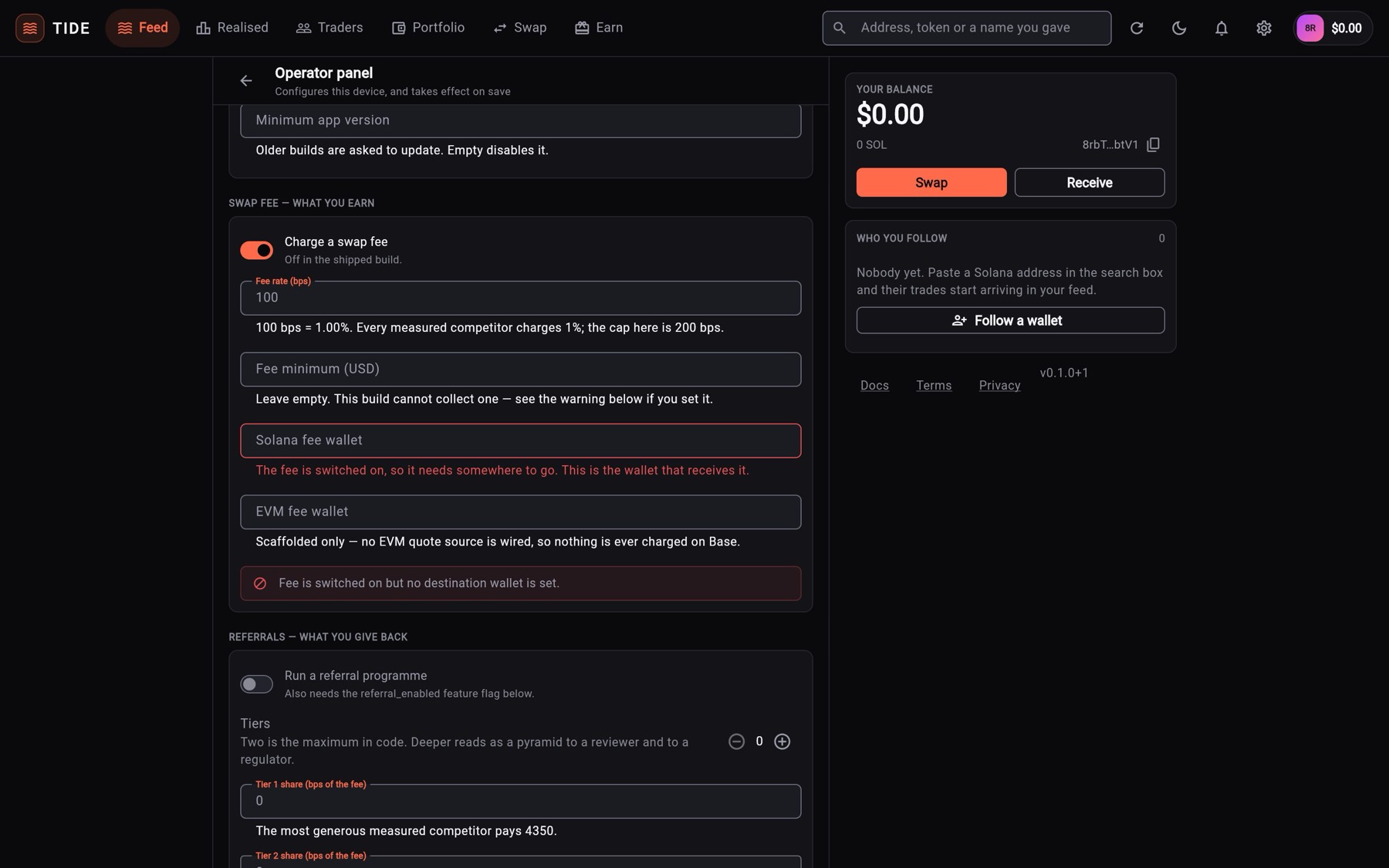
TIDE's admin is a screen inside the app: Settings → Operator panel. This page walks through each section in screen order, with what to set on day one and the limits the code enforces.
01Opening the panel
- Open SettingsThe gear icon in the top bar (wide screens) or the Settings entry on phones.
- Tap Operator panelTIDE asks for the device's own unlock (Face ID, fingerprint or passcode), the same gate as showing the seed phrase.
- Where the device cannot askOn the web build, and on a phone with no screen lock, TIDE asks you to type
OPERATORinstead and says why.
The panel is part of the app your users install, and it changes only the device it runs on. On their own phone a user could, for example, switch the fee off for their own swaps. For a public release, host your configuration with "admin_locked": true (how): the panel then becomes read-only on every install.
02Day-one order
- Identity: name, support address, terms and privacy.
- Endpoints and credentials: your Solana RPC URL.
- Swap fee: your Solana wallet and a rate.
- Referrals and Cashback, if you want them.
- Save and apply, then check In force right now.
- Copy as JSON and host it for every install (how).
03Identity
App name, Tagline, Support email, Website, Terms URL, Privacy URL. Links must be HTTPS; each field says what is wrong. Empty support, website, terms and privacy fields fall back to addresses built from TIDE_HOST (Configuration). The name under the app icon is set at build time (Rebranding).
04Messages
- Announcement: a banner shown to every user. Users can dismiss it; a new text shows again.
- Minimum app version: older builds are asked to update. Empty turns it off. This notice cannot be dismissed.
05Swap fee — what you earn
- Charge a swap fee: the switch. Off in the shipped build.
- Fee rate (bps): 100 bps = 1.00 %. Maximum 200.
- Fee minimum (USD): leave it empty. Jupiter only takes a percentage, so a minimum cannot be collected (why).
- Solana fee wallet: a Solana address you control. It receives the fee.
- EVM fee wallet: Not active in this version No EVM quote source is wired.
The full walkthrough is on Setting up earnings.
06Referrals — what you give back
Run a referral programme, Tiers (0, 1 or 2), Tier 1 share and Tier 2 share in bps of the fee, and Payout threshold (USD). The programme also needs the referral_enabled switch in Features.
07Cashback — what the trader keeps
Pay volume cashback, then up to two bands, each with a name, a start threshold in 30-day traded volume (USD) and a rebate in bps of the fee. Also needs the cashback_enabled switch.
08Trading
- Default slippage: what the swap screen starts at. Maximum 5 %.
- Extra restricted regions: two-letter country codes where copy execution is refused, on top of the six built-in ones (Compliance).
09Features
One switch per feature flag, listed by key. A switch the build cannot honour (evm_chain_enabled) shows the reason and has no effect. The table of flags is in Configuration.
10Endpoints and credentials
- Solana RPC URL: your endpoint. The shipped public node refuses token-balance calls; your own endpoint lifts that.
- Helius API key: Not active in this version Stored, but no network call reads it. Put a full Helius URL in Solana RPC URL instead.
- 0x API key: Not active in this version No EVM quote source is wired.
12In force right now, and warnings
In force right now lists every value the app is running on and the layer it came from: default, cached, remote or this device. If a change did not take, this list shows why. Warnings from the last load lists fee problems and switches the build cannot deliver. The same warnings appear under Settings → About.
13Limits the code enforces
A hosted document cannot raise a value past its cap; values are clamped when they are read.
| Field | Cap | Where |
|---|---|---|
fee.fee_bps | 200 (2.00 %) | SwapFeeConfig.maxFeeBps |
fee.min_fee_usd | $2.00 | SwapFeeConfig.maxMinimumFeeUsd |
referral.tiers | 2 | ReferralProgramConfig.maxTiers |
referral.tier1_share_bps | 5000 (50 %) | ReferralProgramConfig.maxTier1ShareBps |
referral.tier2_share_bps | 1000 (10 %) | ReferralProgramConfig.maxTier2ShareBps |
| All payouts from one fee | 6000 (60 %) | ReferralProgramConfig.maxTotalPayoutBps |
| Cashback bands | 2 | CashbackConfig.maxTiers |
| Cashback rebate | 3000 (30 %) | CashbackConfig.maxRebateBps |
default_slippage_pct | 5.0 | AdminConfigModel.fromJson |
| Copy execution per trade / per 24 h | $1,000 / $5,000 | CopyRule |
| Followed wallets | 25 | WatchlistService.maxWallets |
Not configurable on purpose: the six baseline restricted regions, the maximum tiers and bands, every ceiling above, and anything that maps a referral code to a wallet address.